Fast, consistent and secure automation built by AI

Describe your process once.
It becomes a button.

You describe a process in a chat, and Cryogram's AI builds it into a working automation. Anyone on your team can then run it and get the same result every time, in seconds. If something changes and a step stops working, the AI repairs it.

Cryogram runs locally on your machine, using your own AI key. Your data stays on your machine and in your systems; nothing passes through us. Building and running locally is free.

An example automation, built from one prompt

“Take the CVs that arrive in our jobs inbox, score each one against the role, save a shortlist to the shared folder, and let the team know in Slack.”

runs in seconds · same steps, same order · every run checked and logged ✓ Shortlist saved · Slack notified · run logged

AI for the whole team

Bring the benefits of AI to everyone,
not just the people who enjoy prompting.

Most teams now have at least one person who is great with AI, and plenty of colleagues who never will be. Buying everyone a chat subscription does not change that: most people never learn to prompt well, and the people who do each solve things in their own way, so the quality of the result depends on who did it and how. It is the feeling behind a sentence like “I can do this with AI, but I can't get everyone else to.”

Cryogram closes that gap from both ends. The people who enjoy AI describe the processes and keep improving them, and everyone else gets ready-made, AI-powered tools that work the same way every time - before they have learned any AI themselves. Here is how that compares with the tools teams usually try first:

App-to-app automation toolsZapier · Make · n8n · Power Automate AI agents and assistantsChatGPT · Claude · Copilot · Manus · Lindy AI workflow buildersGumloop · CodeWords · Cassidy Cryogram
How it runs Fixed steps you set up The AI redoes it from scratch every run Mostly the AI, every run Fixed software, with AI only where a judgement is needed
Where it runs Their cloud Their cloud Their cloud On your own computer or our cloud
The AI builds it for you partially
Fully custom steps, not just pre-built connectors partiallypartially
Works with any AI model, including a local or your company's own partially
Fixes itself when something changes ✓*
Your data stays private, on your own machine
See and test exactly what each step does partially
Share it with your team to run partially
Runs on a schedule or trigger, with your computer off partially

* AI agents cope with change by re-thinking the task on every run, which is also what makes them slower and more variable from run to run. Cryogram repairs the automation once, and the fix is tested before it goes live.


How it works

You describe it. Cryogram builds it.
Your team runs it.

Cryogram's AI does the job once, for real, on an example you give it. The routine parts of what it did - fetching the file, reading the columns, formatting the output - are turned into ordinary software, which means the same input gives the same output, every time. AI stays only in the steps that genuinely need judgement, such as scoring a CV or drafting a reply. That is why a finished automation runs in seconds and costs almost nothing to use.

Describe the process

Tell Cryogram what you want in a chat, and point it at a real or sample file, inbox or system. It does the job once in front of you, and you correct and approve as it goes.

Watch it take shape

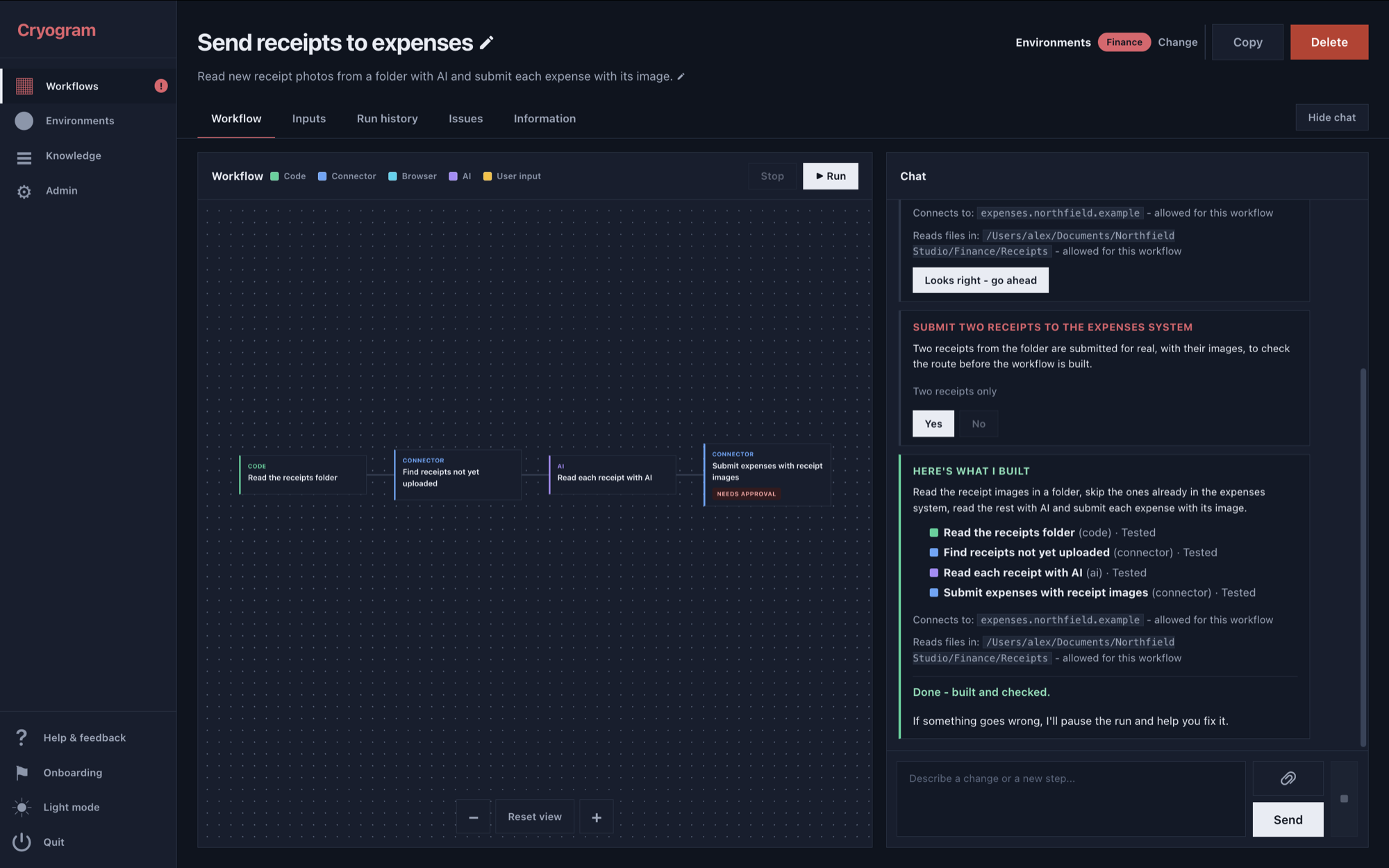
The automation appears as visible steps you can read, test one at a time and adjust. You can see exactly what each step does before you rely on it.

Run it on real data

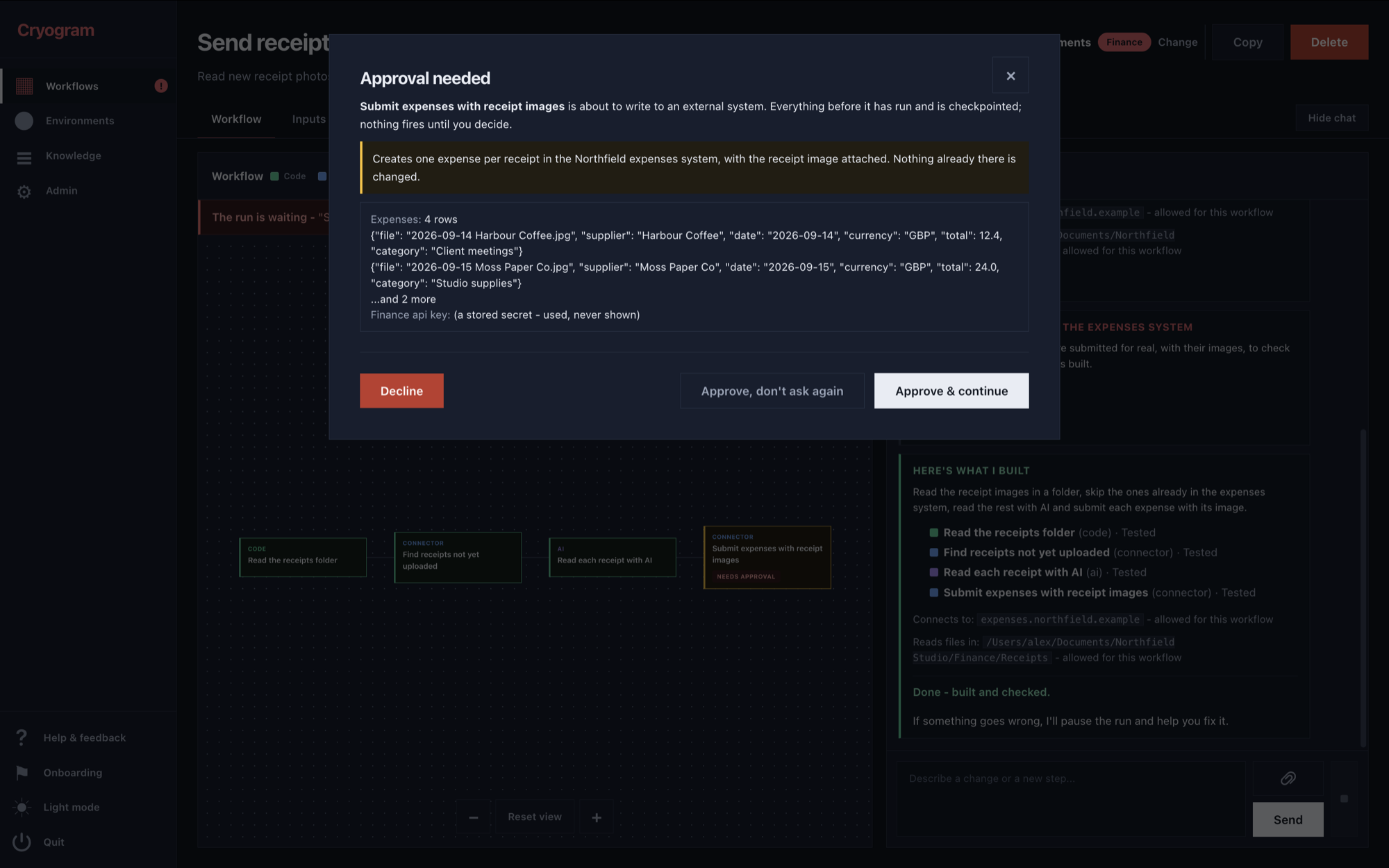
Press Run. It asks when it needs a decision, requests your approval before anything is sent out, and hands back the results with a full history of every run.

It looks after itself. Every step carries a full set of tests, created during the build, and every run is checked against them - so anything unexpected is flagged rather than passed along. The AI investigates what changed and proposes the repair, and a fix only goes live once it passes the tests again. Any step that touches an external system, such as sending an email or updating a record, asks you before acting. And when something cannot run correctly, the automation stops and tells you, instead of producing something plausible and wrong.

Runs in seconds Executing an automation takes seconds, because the routine steps are ordinary software and never wait for an AI to think.
The same result every time Every run follows the same steps in the same order, and each step checks its work before the next one starts.
You can see inside it The automation is laid out as visible steps you can read, test and adjust, with a full history of every run and its results.
Private by design It runs on your machine with your own AI key. Your data stays in your files and systems, and nothing passes through us.

Pricing

Free on your machine.
Pay when it runs without you.

You build and run your automations on your own machine, using your own AI key. Everything stays private: your files, your data and your workflows never pass through us. The local app is free to download and free to keep using.

Local
Free, on your machine, with your own AI key
  • The full builder: describe a process in a chat and get a working automation
  • Unlimited automations, run locally in seconds
  • Everything visible: plain-language runs, approvals, mid-run questions, results and run history
  • Local scheduling while your machine is on
  • AI-powered repair, on your own key

Bring your own Anthropic key or subscription. Everything you build and run stays on your machine.

The plain version: anything you build and run on your machine is fully private - we cannot see it and cannot touch it. Cryogram Cloud exists for the moment you want an automation to have a life beyond you triggering it yourself.


Examples

Things our users have automated.

Every automation built with Cryogram works the same way: you can open it and see exactly what it does, it does the same thing on every run, it finishes in seconds, and many need no AI at all once built. You can build against sample data and then run on real data, so everything stays on your machine and in your own systems. Sharing finished automations with colleagues arrives with launch.

A recruitment agency

CV intake turned into scored shortlists, candidate lists kept clean, outreach prepared, and a weekly activity digest.

An accounting practice

Invoices and receipts read into ledgers and sheets, monthly report packs assembled, and client reminders prepared.

A sales team

Lead lists cleaned and enriched, outreach merges prepared, the CRM kept in sync, and weekly digests delivered.

An estate agency

Listing descriptions drafted from particulars, portals updated, viewing follow-ups sent, and ad performance summarised.


Questions

The short answers.

How is this different from Zapier or n8n?

With app-to-app automation tools, someone on your team assembles and maintains every automation by hand. With Cryogram, you describe the process in a chat and the AI builds it by doing the job once in front of you. What you keep is the same kind of dependable, inspectable automation, without anyone spending their afternoons wiring boxes together.

How is it different from just asking an AI agent every time?

An agent re-thinks the whole task on every run, so each run is slow, uses paid AI, and can come out differently from one day to the next. Cryogram runs the routine steps as ordinary software, identically every time and in seconds, and uses AI only in the steps that genuinely need judgement.

Do I need my own AI key?

Yes. The local app runs on your own Anthropic key or subscription, which is part of why it can be free and fully private: nothing of yours passes through us. Cryogram Cloud includes what it needs to keep published automations healthy.

What happens when an automation breaks?

It stops safely mid-run and tells you in plain language what stopped and why. The AI then investigates and proposes a repair, and the fix goes live only after passing the automation's tests again. Anything that touches the outside world asks you before acting.

Read the full FAQ →

Early access

Start automating.

We are opening access in batches, so that everyone who joins gets properly set up and supported. Leave your name and email and we will let you know when your access is ready. If you also tell us whether you are signing up as an individual or for a team, and what you would like to automate, we can send you the right getting-started guidance - but that part is optional. The newsletter is a tick box in the form; if you leave it unticked, the only email you will get from us is your invitation.